
Introduction
TinyBits, as presented in the previous blog, is promising to be a fast and extremely space efficient serializer. Multiple compression techniques contribute to that efficiency, but I reckon that the biggest contributor is the string deduplication feature. The string deduplication removes repeated strings (up to 256 strings per document, between 2 and 128 bytes in length each) and replaces the repetitions with back references to the first occurrence in the packed buffer.
String deduplication works very nicely for arrays of maps with repeated map keys, or with things like tags or enums. Check the following example:
[
 {name: "Alice", age: 30, roles: ["employee", "manager", "mentor"]},
 {name: "Anwar", age: 29, roles: ["employee", "mentee"]},
 {name: "Samir", age: 34, roles: ["employee", "director", "mentor"]}
]
The structure above lends itself very well to string deduplication, the strings “name”, “age”, “roles”, “employee”, “mentor” will all be written once, saving ~46 characters when packed. It is indeed much smaller than all the schema-less alternatives
| Encoder | JSON | Msgpack | CBOR | TinyBits |
| Packed Size (bytes) | 190 | 138 | 141 | 92 |
This delta will only grow with larger documents with more repetitions! But what about small documents?
Small Documents
If we have a document without repetitions, as such:
{name: "Alice", age: 30, roles: ["employee", "manager", "mentor"]}
How would TinyBits fare? Basically very similar to other tools:
| Encoder | JSON | Msgpack | CBOR | TinyBits |
| Packed Size (bytes) | 65 | 48 | 49 | 48 |
With such a small document TinyBits lost its advantage and became virtually equal to the other binary contenders. Of course the document is already very small, not a lot of data to transfer or store anyways. But imagine if you are generating millions of these for transfer and storage, and imagine them being transferred individually, perhaps due to them being generated discreetly and sent in real time. In that case, over the many documents transferred or stored, we will be wasting a lot of bandwidth or disk space. What happens if we try a fixed schema option here? Ugly to use as it is, Google’s protocol buffers (protobuf for short) is a very compact format, mainly because of its schema, let;s see how it compares.
| Encoder | JSON | Msgpack | CBOR | TinyBits | Protobuf |
| Packed Size (bytes) | 65 | 48 | 49 | 48 | 36 |
Protobuf emerges as a clear winner here, for small, structured data, it cannot be beat, you only have to write a lot of boiler plate and also write a schema and compile it using an external tool. And you have to do that for every type of document you deal with, and you need to keep those schema definitions up to data and recompile them as your schema evolves. Oh and that compiler targets a specific host language, if you use multiple languages across the stack, you need to compile for each one that will encode or decode your data. Some people *might* really need the efficiency and structure and hence go through all that trouble, other protobuf users maybe just enjoying the pain, I don’t know!

There must be a better way though, reaping the benefits of having a known structure without the complexities that accompany something like protobuf!
External Dictionaries FTW
In TinyBits Ruby gem version 0.5 a new feature was introduced. Basically the ability to use an external string deduplication dictionary. It is a very simple concept really. Basically supply an array of strings to the packer, then it will use it to deduplicate strings from any object you pass to it. You need to supply the exact same array to the unpacker (in the same order) and it will unpack the objects correctly.
Let’s see how a dictionary would look like in our case
require 'tinybits'

dict = ["name", "age", "roles", "mentor", "mentee", "employee", "manager", "director"]
doc = {name: "Alice", age: 30, roles: ["employee", "manager", "mentor"]}

packed = TinyBits.pack(doc, dict)
In the dict array, we included all the possible map keys and also all the possible roles, this way, these strings will be stripped away from the packed buffer. A dictionary can have up to 256 values and each string needs to be between 2 and 128 bytes in length.
Let’s see how that dictionary affected our results
| Encoder | JSON | Msgpack | CBOR | TinyBits | Protobuf | TinyBits (dict) |
| Packed Size (bytes) | 65 | 48 | 49 | 48 | 36 | 15 |
Indeed, our packed buffer is now only 15 bytes in size, less than 42% of protobuf’s!
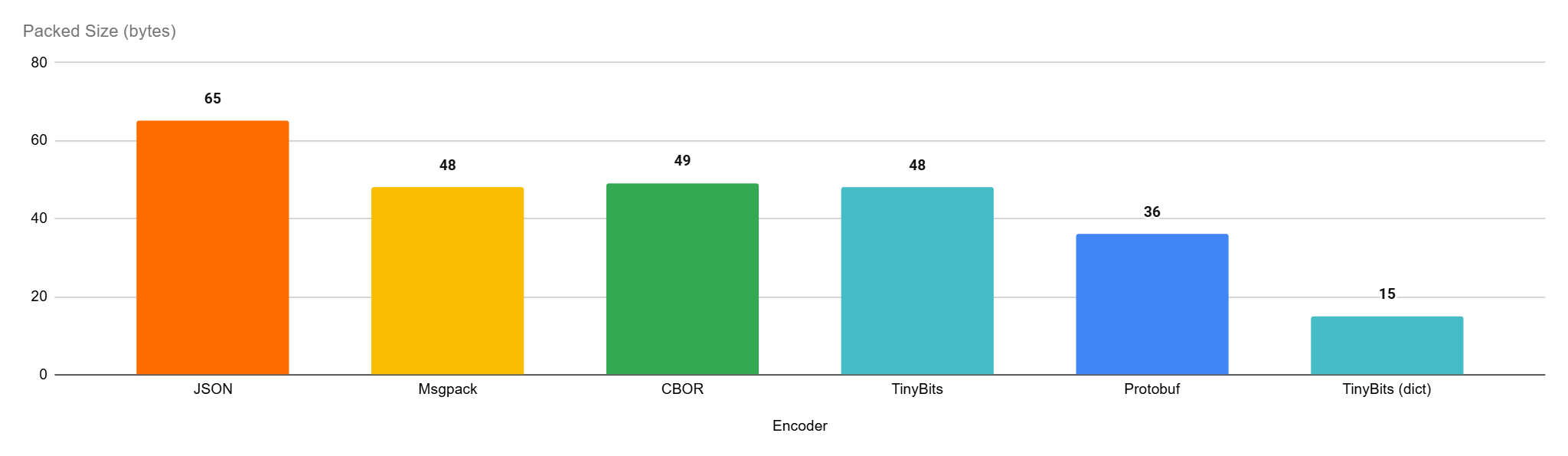
Of course this is an example where there are tags that can be deduplicated, if there is only the keys in the dictionary, we end up with exactly the same size as the protobuf packed buffer, 36 bytes.
API
The dictionary can be used in 2 ways, either via the convenience class methods TinyBits.pack(object, dict=nil) and TinyBits.unpack(buffer, dict=nil). Or, they can be used via the new classes TinyBits::DPacker and TinyBits::DUnpacker as such:
require 'tinybits'
dict = [ .. ]
packer = TinyBits::DPacker.new(dict)
unpacker = TinyBits::DUnpacker.new(dict)

# use the single object interface
packer.unpack(packer.pack(obj))

# or use the multi-object interface
objects.each{|obj| packer << obj}

unpacker.buffer = packer.to_s
while !unpacker.finished?
 pp unpacker.pop
end
Using the DPacker/DUnpacker classes is quite faster than using the convenience methods and is generally recommended if performance is a target, as it should always be!
Real World Advantages
Aside from synthetic documents and isolated benchmarks. I have been using TinyBits to serialize instrumentation data collected from an app I am working on. The data has wildly varying schema, making an option like protobuf very unappealing. I actually tested TinyBits against JSON and Msgpack to see the impact in such a setup. The application in question was hammered with 10K requests in succession and the data was encoded incrementally in all cases and a background thread compressed it periodically using Zstd and shipped it to a collector. Here are some metrics from this operation.
| Compressed Size (KB) | Performance Impact (%) | Process Memory (MB) | |
| JSON | 3,185 | 22% | 208 |
| Msgpack | 3,198 | 31% | 167 |
| TinyBits | 2,097 | 16% | ,163 |
Please note that this is a very fast path that doesn’t do much, hence the impact of instrumentation is quite high.
Here’s the above in a visual format:
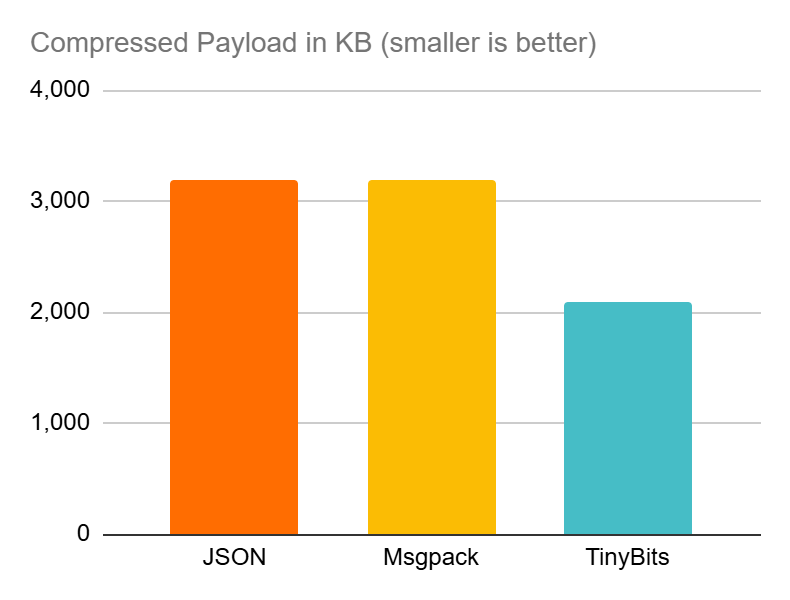

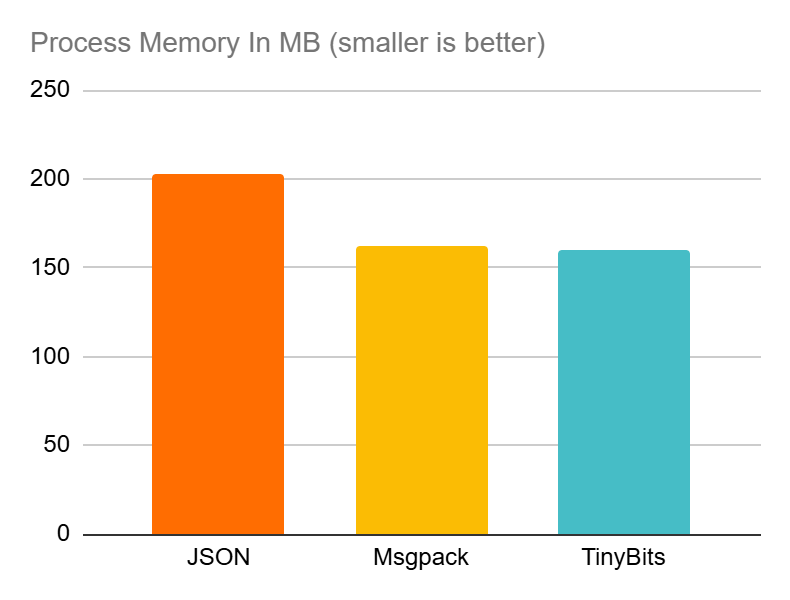
What’s not to like? TinyBits is delivering the smallest data sizes while having the lowest impact on system resources and application performance.
Not that even when the requests are few and far between, the payloads are still much smaller for TinyBits, thanks to its dictionary usage.
Bonus Use Case: Specialized Small String Compressor
This is not a very common use case but can be very helpful in certain cases. Imagine if you have smallish strings that generally use a specific vocabulary or syntax. Like for example SQL queries. Many of these are so hard to compress individually and will hardly yield any benefit with a genera purpose compressor. Let’s take this example SQL string.
sql = "SELECT c.CustomerID, c.FirstName, c.LastName FROM Customers AS c WHERE c.IsActive = 1 ORDER BY c.LastName ASC"This string is 109 bytes in size. If we use Zstd for example to compress it we end with 97 bytes. ~12% reduction in size. Now if we have a SQL syntax dictionary, we can use that for such SQL strings, for example:
dict = [
  "SELECT", "FROM", "WITH", "GROUP", "BY", "ORDER", "BY",
  "LEFT", "JOIN", "OVER", "AS", "ON", "ASC", "DESC", "HAVING",
  "INNER", "COUNT", "SUM", "DISTINCT", ">=", "<=", "BETWEEN", "AND"
]
Now let’s do something really silly, let’s split that SQL string on spaces and feed it to TinyBits, along with the dictionary:
packer = TinyBits::DPacker.new(dict)
packer.pack(sql.split)
Now the resulting packed buffer is only 80 bytes, a ~34% reduction in size. While being 33% faster to compress as well than Zstd.
Now this is a very special situation where the document size and the vocabulary scope were both playing into the strengths of TinyBits and disadvantaging Zstd at the same time. Training a Zstd dictionary may flip the situation, but still, there will be cases where it would be much easier to just use TinyBits with an improvised dictionary and get instant results.
TinyBits Is Now More Versatile
Whether you have large payloads with repeated keys/data, or you have small payloads with known keys (or data), TinyBits got your back. Offering fast, memory efficient and space efficient serialization for any data you throw at it. Here’s where it shines:
- Arrays of maps with repeated keys (most payloads)
- Arrays of floats with less than 12 decimal points (e.g. vector embeddings)
- Small records with know keys/data (e.g. sparse real-time metrics)
- Payloads with repeated data (e.g. controller/action names in instrumentation payloads)
- Small strings with a limited vocabulary (e.g. sql strings,
You are a simple bundle add tinybits or gem install tinybits away from having a great option for your data transfer/storage needs.
 Oldmoe's blog
Leave a comment