Introduction
If you are running a production Rails application using SQLite then you are probably using SQLite as a cache store as well. Compared to something like Redis or Memcached, SQLite offers a potentially much larger caching space and a significantly higher read performance, which is what matters most when we are dealing with caching. One other important advantage of SQLite based caching is that it also benefits from the features provided by the filesystem or volume manager underneath it, like for example transparent compression.
In this article we will be looking at two SQLite based cache stores for Rails, Litecache, which is a part of the Litestack library of SQLite based data components and SolidCache, which is the new ActiveRecord Based cache store for Rails and one that can be configured to use SQLite.
Litecache
Litecache builds on top of SQLite via Litestack provided abstractions, as a result it enjoys a fine tuned, raw, SQLite connection, automatic thread/fiber environment detection and fork resilience.
To configure Litecache for you Rails application you need to add the following line to your Gemfile
gem "litestack"
Then run
bundle update
Then in your environments/production file
config.cache_store = :litecache
Optionally, you could also run the installer to configure other litestack components
rails generate litestack:installWith that in place, you can now use the Rails cache and it will be using Litecache which utilizes SQLite.
Solid Cache
Solid Cache provides a Rails cache store that builds on top of ActiveRecord, hence it comes with all the bells and whistles that ActiveRecord has, like having adapters for many database engines, including PostgreSQL, SQLite, MySQL and MongoDB. It also provides the infrastructure needed for using sharded databases and utilizing primary/secondary database. These features can be used directly in Solid Cache and are potentially useful for really large setups.
To use Solid Cache you need to add the gem to your Gemfile
gem "solid_cache"
And then run
bundle update
You are expected to already have SQLite configured for your database (either via the sqlite3 adapter or Litestack’s Litedb adapter)
production:
  adapter: sqlite3
Then generate the migrations (for the correct environment)
RAILS_ENV=production rails solid_cache:install:migrations
Then run the migrations
RAILS_ENV=production rails db:migrate
And in config/environments/production
config.cache_store = :solid_cache_store
At this point, you can use solid cache right away. Please refer to the Solid Cache gem page on github for more information, and more configuration options regarding Solid Cache.
Not all SQLite caches are created equal
Even though both Litestack and Solid Cache can be using SQLite, they have vastly different feature sets and performance characteristics. This is largely due to how each of them abstracts the underlying physical cache store.
Litecache, a bare metal approach
Litecache uses raw connections in the most efficient way possible, it avoids creating explicit transactions when it can and it tries to rely solely on prepared statements to improve latency. As a result, Litecache performance is really fast, actually even faster in reading cache entries than Redis and any other network based solution.
Solid Cache, standing on the soldier of giants
As mentioned earlier, Solid Cache builds heavily on the foundation built by ActiveRecord. Making it a very versatile solution with advanced for mapping cache operations to a potentially complex setup of sharded, distributed and replicated databases. Though this comes at the price of having all these layers of abstraction between the cache operation and the physical store.
It can be argued that, in the case of an application utilizing SQLite in production, that application will generally be confined to a single box. The chances that such an application needs a very elaborate setup for caching, that utilizes multiple SQLite databases, such that it will sacrifice latency for scale are very slim of not nonexistent.
Performance benchmarks
We will look at how both solutions, Litecache and Solid Cache with SQLite perform various read/write operations with different payload sizes.
All benchmarks were ran using the default configuration for each library, though the SQLite connection for Solid Cache was tuned to increase read/write performance. The following pragmas were configures:
PRAGMA journal_mode = WAL;
PRAGMA synchronous = 1;
PRGAMA mmap_size = 134,217,728;
The tests were ran on an AMD Ryzen 8740HS machine.
Write throughput (writes/second)
| Payload Size | 10 | 100 | 1000 | 10000 |
| Litecache | 14,763 | 15,194 | 16,165 | 12,169 |
| Solid Cache | 3,073 | 3,008 | 2,526 | 2,826 |

As can be seen, Litecache writes are much faster than Solid Cache writes, up to 5X faster at times. Of course in a more concurrent test both solutions will suffer a little, but Litecache’s faster operations should lead to even less write contention vs Solid Cache which will be holding write locks for much longer.
Read throughput (reads/second)
| Payload Size | 10 | 100 | 1000 | 10000 |
| Litecache | 56,302 | 53,077 | 51,378 | 25,658 |
| Solid Cache | 18,165 | 17,861 | 18,172 | 12,674 |
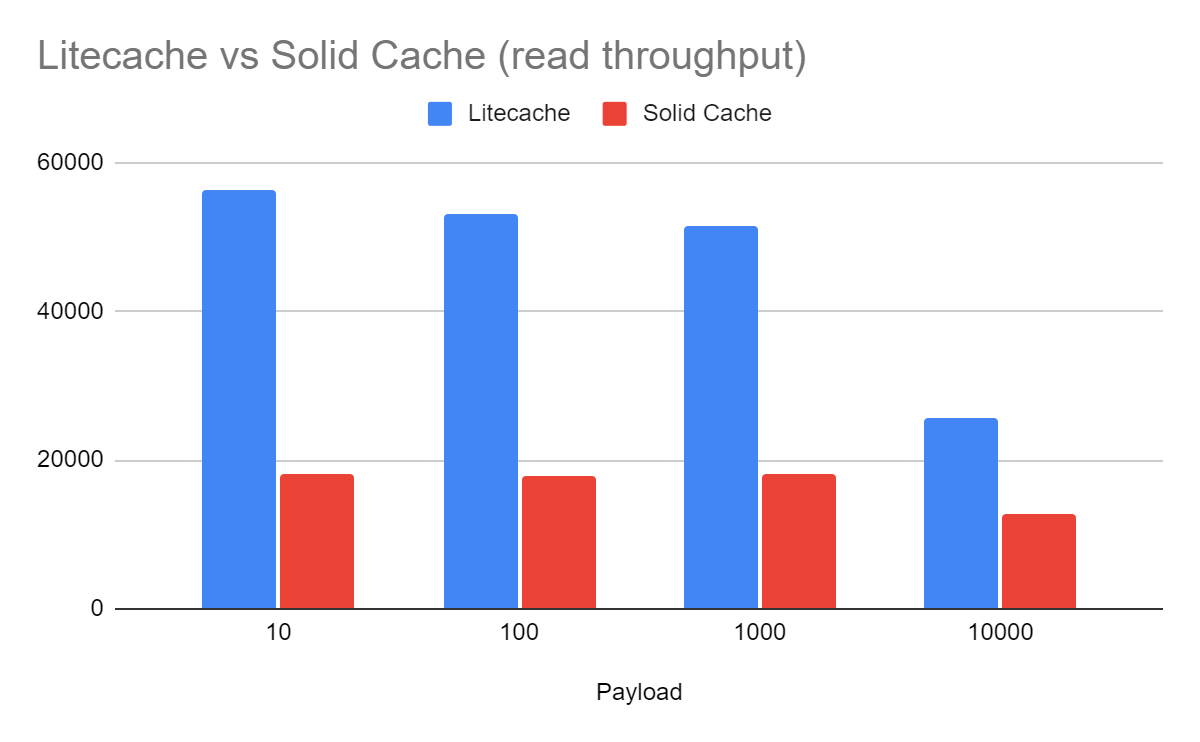
During reads, Litecache retains a solid advantage over Solid Cache, though it is not as profound as writes it is still quite remarkable as it reaches over 3X at times. The difference dips to 2X as the payload size increases, which is understandable, as the ActiveRecord overheads start to become less pronounced compared to the overhead of moving the large data records around.
Conclusion
Both Litecache and Solid Cache provide a SQLite based caching option that you can use for your Rails applications that utilize SQLite in production. Though due to their different design choices, Litecache delivers much higher cache performance over Solid Cache. And while Solid Cache comes with a lot of goodies from its ActiveRecord foundation, those are hardly useful in the context of a Rails app utilizing SQLite in production.

 Oldmoe's blog
Leave a comment